¶ Commands
Commands allow you to control your ships or fleets in the galaxy.
¶ Ships vs Fleets
Fleets and ships use the same commands, so when we speak about a ship doing this or that, it is the same for a fleet.
¶ Chaining Commands
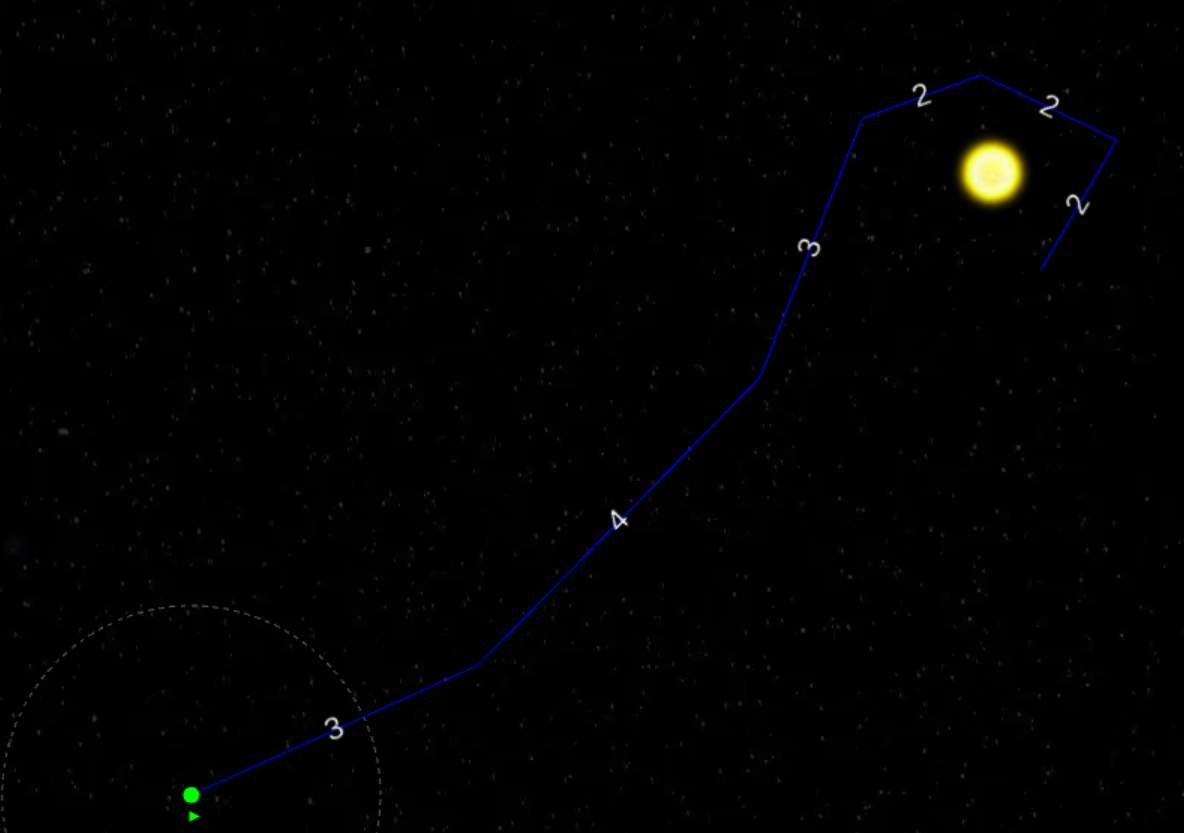
An important part of using commands is the ability to chain them. You can give a ship multiple commands in one go: move here, attack that, move there, and the ship will process them one by one. Not all commands can be chained though; this will be indicated in the command list below.
¶  Move
Move
The move command allows you to move a ship to a specific location. The map will automatically snap to objects like stars, ships, and planets, but you can also click anywhere on the map as a target.
Shortcut key: m
✅ Can be chained
✅ For fleets as well
✅ Snaps to objects on map
✅ Target any location on the map
¶  Attack
The attack command allows you to attack a stationary target on the map. You need to select a location and then an enemy. Your ship will automatically fly to the location and attack whatever that specific enemy has at that location. This includes planets, ships, etc.
You do not have to give a separate move command; the attack command will move first and then attack. If the target is no longer at the location when the ship arrives, the attack command will be aborted and the next command in the queue will be executed.
Shortcut key: a
✅ Can be chained
✅ For fleets as well
✅ Snaps to objects on map
❌ Target any location on the map
¶  Settle
The settle command is used to colonize uninhabited planets. With a settle command, the ship will automatically fly to the selected planet and attempt to colonize it.
Shortcut key: s
✅ Can be chained
✅ For fleets as well
✅ Snaps to objects on map
❌ Target any location on the map
¶ Common Issues with Settling
- Trying to settle with a ship (design) without a colonization pod.
- Targeting planets that are already settled. With the fog-of-war system, the data you have about the planet might be outdated.
- Not putting scanners on the settler. Flying a settler to a star will not automatically reveal all the planets. You will need to send a scout first or add scanners to your settler design.
¶ Multi-Settle
The settle command is intelligent enough to detect when you give more than one settle command in a row (for example, selecting 5 ships and giving the settle command to 5 different planets). In that case, the system will fly each ship directly to a different planet. This only works if you give only chained settle commands without any other command.
¶  Follow
The follow command allows you to follow any ship from any player, including yourself. You select the target location and player. The system will automatically pick one ship of the selected target player at that location and follow it.
¶ Following Has Multiple Phases
Tracking: The target ship is within your scanning range and you are flying towards it.
Tracking Lost: The target ship is no longer within your scanning range and you are flying to its last known location.
On Target: Your ship is at the same location as your target ship.
Once tracking is lost and your ship arrives at the last known location of the target, it will give up. However, if at any time before reaching the last known location the target ship is detected again, the ship will retarget and resume following.
Tracking is based on all scanning data available to you. If the target is detected by a planet, it will still trigger the following ship to set course to the target.
You can chain this command, and when following is no longer possible it will move to the next command in the chain.
Shortcut key: f
✅ Can be chained
✅ For fleets as well
✅ Snaps to objects on map
❌ Target any location on the map
¶  Follow & Attack
Follow & Attack is a combination of the Follow and Attack commands. It will try to catch up with the target ship and attack it.
Shortcut key: t
✅ Can be chained
✅ For fleets as well
✅ Snaps to objects on map
❌ Target any location on the map
¶  Explore
The explore command makes your ships fly to stars you have not visited before. This is a great way to explore the galaxy. Once you have visited all stars, the explore command switches to re-exploration, revisiting stars so your map stays up to date.
Shortcut key: e
❌ Can be chained
❌ For fleets as well
❌ Snaps to objects on map
❌ Target any location on the map
¶  Repair
Repair allows ships fitted with a repair component (e.g. Nanobot Repair Matrix, Infused Repair System) to recover hit points. While repairing, the ship stays stationary. You can choose to repair until fully healed or for a fixed number of days.
¶ Common repair issues
- A ship can only repair itself — repair components don't heal other ships in the same fleet.
- One repair component does very little; fitting several is what gives a noticeable rate.
- With fleets, the entire fleet must be fully repaired before it can resume the next command.
Shortcut key: r
✅ Can be chained
✅ For fleets as well
❌ Snaps to objects on map
❌ Target any location on the map
¶  Defend
Defend makes the ship stay in one location and scan for enemy ships. Once an enemy is found, it will trigger a Follow & Attack command against the enemy. After the enemy has been destroyed or the target is lost, the ship will return to its original coordinates and resume defending.
Note: A ship needs scanners for defend to work, as it relies on its own scanners.
Shortcut key: d
❌ Can be chained
✅ For fleets as well
❌ Snaps to objects on map
❌ Target any location on the map
¶  Wait
Wait
The wait command pauses the ship for a specified number of days, then moves on to the next command in the chain. Useful for staging — for example, letting a core fleet wait while reinforcements catch up.
Shortcut key: w
✅ Can be chained
✅ For fleets as well
❌ Snaps to objects on map
❌ Target any location on the map
¶  Patrol
Patrol allows ships to follow a route defined by you on the map. This is useful for detecting incoming enemy ships earlier.
Shortcut key: p
❌ Can be chained
✅ For fleets as well
❌ Snaps to objects on map
❌ Target any location on the map
¶  Patrol & Defend
Patrol & Defend is a combination of the Patrol and Defend commands. Ships patrol a defined route while scanning for enemies. As soon as an enemy is detected by the ship’s scanners, it switches to a Follow & Attack command. Once finished, the ship returns to its patrol route and resumes patrolling.
Shortcut key: shift-p
❌ Can be chained
✅ For fleets as well
❌ Snaps to objects on map
❌ Target any location on the map
¶ Utility shortcuts
Beyond the per-command keys above, a few more shortcuts apply when you're queuing actions:
| Key | Action |
|---|---|
Esc |
Cancel the pending action you were about to place |
Delete / Backspace |
Remove the last action you queued |
L |
Detach the selected ships from their current fleet |